How to Automate Customer Support with an AI Agent: A Step-by-Step Guide
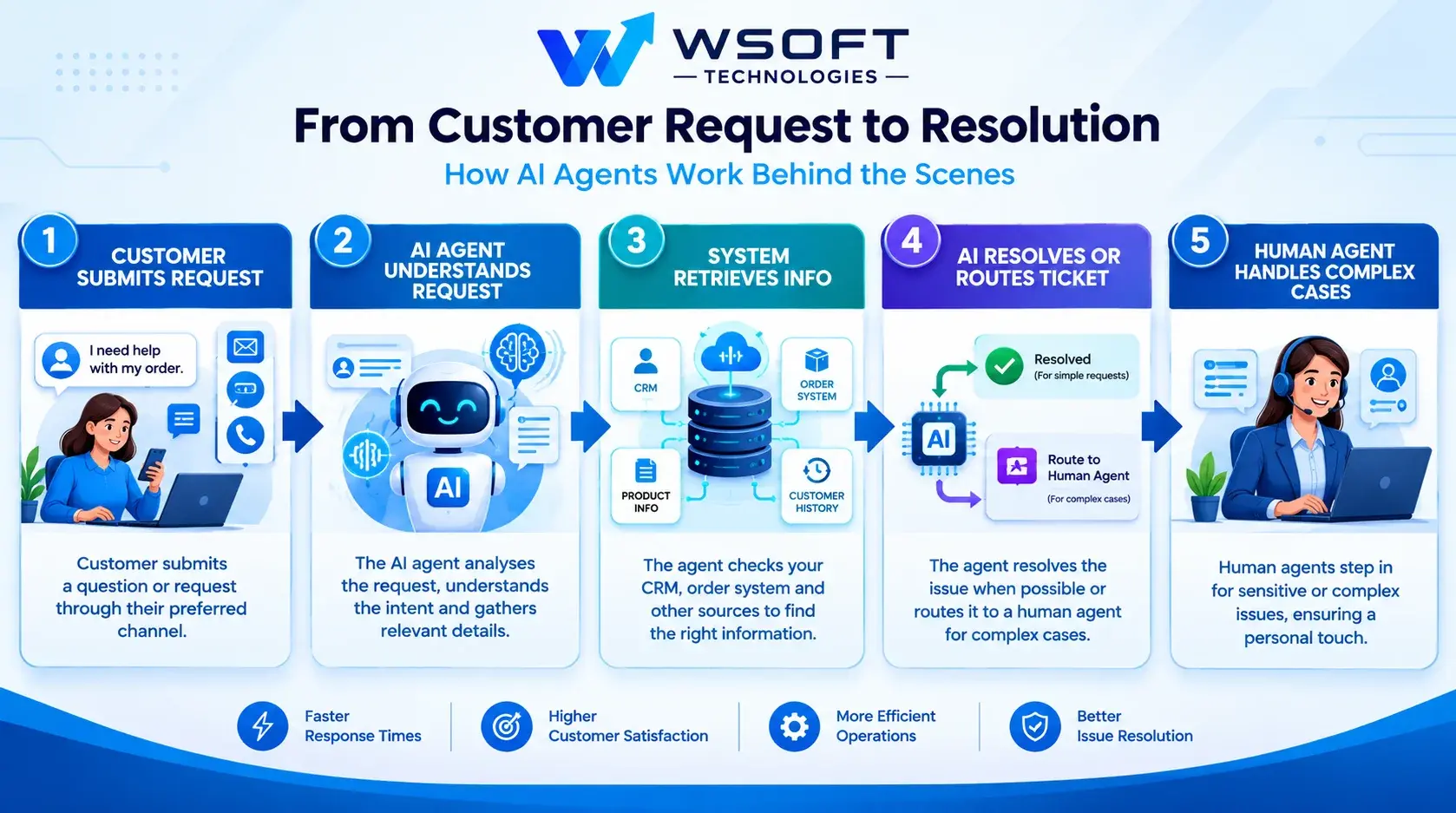
Customers expect fast answers at any time of the day. However, hiring enough support staff to respond to every email, live chat, and message around the clock can be expensive, especially for startups and small businesses.
That is where AI agents can help. An AI customer support agent can answer common questions, check order statuses, route support tickets, and pass difficult cases to a human team member. This helps customers get quicker answers while giving your support team more time to handle complex issues.
What Can an AI Agent Do in Customer Support?
An AI support agent can automate many repetitive tasks that take up your team's time every day.
Depending on your business needs and system integrations, it can:
- Answer frequently asked questions about products, services, and company policies.
- Check order statuses using connected business systems.
- Categorise incoming support tickets and send them to the right team.
- Help customers find information about returns and refunds.
- Summarise long support conversations for human agents.
- Provide basic support outside normal business hours.
- Escalate complicated or sensitive issues to a human team member.
The best approach is to start with simple, repetitive tasks and expand automation as the agent proves reliable.
Automate Refund Requests with AI
Refund requests require extra care because they involve money and company policies. To automate refund requests with AI, set clear rules about which requests the agent can handle independently.
For example:
- Allow automatic approval only for eligible refunds that meet your return policy and set limits.
- Send high-value, unusual, or disputed requests to a human for review.
- Require the agent to check order details and the applicable refund policy before responding.
- Record each decision, including the reason for approval, rejection, or escalation.
These safeguards help keep refund decisions consistent while reducing the risk of costly mistakes.
How to Write Prompts for a Customer Support AI Agent
Prompts are instructions that guide how an AI agent responds and behaves. Knowing how to write prompts for a customer support AI agent is an important part of building a reliable support system.
A good prompt should explain the agent's role, communication style, responsibilities, and limits.
Include these five elements:
- Role: Tell the agent who it is. For example, "You are a friendly customer support agent for [Company]."
- Tone: Ask it to use polite, clear, and concise language.
- Rules: Instruct it to use approved company information, avoid inventing policies, and protect private customer data.
- Escalation: Explain when it must pass a conversation to a human.
- Response format: Keep replies easy to understand and end with a useful next step when appropriate.
For example, you could include this instruction:
"If the answer is not available in the approved knowledge base, do not guess. Explain that you need help from a team member and offer to connect the customer with the support team."
Test your prompts with real customer questions and improve them based on the results. Small changes to instructions can make the agent's responses clearer and more consistent.
How to Test an AI Support Agent Before Launch
Launching an AI support agent without proper testing can lead to incorrect answers, frustrated customers, and unnecessary support requests.
To test an AI support agent before launch, follow these steps:
- Collect real customer questions. Start with around 100–200 questions from previous support tickets, if available. Include common questions and recurring problems.
- Check the agent's answers. Run the questions through the agent and review each response for accuracy, clarity, and tone.
- Test difficult situations. Include angry customers, unclear requests, refund disputes, and questions that require human assistance.
- Test its limits. Ask questions outside your business scope and check whether the agent follows its instructions instead of making up answers.
- Run a small pilot. Introduce the agent to a limited group of users or launch it on one support channel first.
- Fix problems and test again. Update the prompts, knowledge base, and workflows before making the agent available to everyone.
Testing should continue after launch, especially when you change the AI model, connect new tools, or update company policies.
Add Live Chat Handoff to an AI Agent
Even a well-designed AI agent cannot handle every customer issue. A smooth live chat handoff gives customers access to a human when they need additional help.
Configure the agent to transfer a conversation when:
- The customer directly asks to speak to a person.
- The customer becomes angry or frustrated.
- The agent cannot find a reliable answer.
- The issue involves a sensitive decision, safety concern, or high-value transaction.
- The request falls outside the agent's permissions or responsibilities.
During the handoff, the agent should pass the conversation history and a summary to the human support representative. This prevents customers from having to explain the same problem again.
It should also tell the customer what is happening. For example:
"I'm connecting you with a member of our support team who can help with this. I'll pass along the details you've already shared."
A clear handoff process makes AI support more helpful without leaving customers stuck when the agent reaches its limits.
Use AI to Summarise Support Tickets
Long email threads and detailed support conversations can take time to review. When you use AI to summarise support tickets, human agents can understand the issue more quickly and decide what to do next.
A useful ticket summary should include:
- Main issue: What problem is the customer reporting?
- Actions already taken: What troubleshooting steps or solutions have been tried?
- Current status: Is the issue resolved, ongoing, or waiting for information?
- Suggested next step: What should the support team do next?
For example, instead of reading a long conversation about a delayed order, an agent could review a summary explaining the delivery problem, the checks already completed, and the action still required.
AI-generated summaries can also help with team handovers, shift changes, and managers reviewing open support cases. Human agents should still be able to access the original conversation when they need more detail.
How to Improve AI Chatbot Accuracy
Accuracy is essential for customer trust. If an AI chatbot regularly provides incorrect information, customers may stop relying on it and contact your support team instead.
To improve AI chatbot accuracy, focus on the following areas.
- Keep your knowledge base updated. Remove outdated information and add new product details, policies, and answers.
- Organise help articles clearly. Give each article a specific topic and use simple headings so information is easier to find.
- Use trusted business data. Connect the agent to approved sources rather than allowing it to guess. Retrieval-augmented generation (RAG) can help the agent retrieve relevant information from your knowledge base.
- Review incorrect answers. Check failed conversations regularly and update the relevant content, instructions, or workflow.
- Teach the agent when to stop. If reliable information is unavailable, it should ask for clarification or escalate the issue.
- Validate important information. Check order details, refund eligibility, and customer records against the relevant system before taking action.
Improving accuracy is an ongoing process. Regular reviews help your agent keep up with changes in your business and customer needs.
How to Monitor AI Agent Conversations
Launching your AI support agent is only the beginning. You need to monitor its performance to understand whether it is helping customers and reducing your team's workload.
To monitor AI agent conversations, track these key metrics:
- Resolution rate: How many issues does the agent resolve without human assistance?
- Escalation rate: How often does the agent transfer conversations to a human?
- First response time: How quickly does the agent respond to a customer's first message?
- Customer satisfaction (CSAT): How do customers rate their support experience?
- Failed questions: Which questions does the agent struggle to answer?
- Cost per conversation: How much does it cost to handle each interaction?
Review a sample of conversations every week. Look for incorrect answers, repeated questions, unnecessary handoffs, and situations where the agent should have escalated sooner.
Use these findings to improve the knowledge base, prompts, and workflows. Make sure your monitoring process also protects private customer information and follows your data-handling requirements.
How to Reduce Ticket Volume with AI
Many businesses want to know how to reduce ticket volume with AI without making customer support harder to access.
The following steps can help:
- Automate common questions. Start with the ten most frequently asked questions, such as opening hours, delivery information, or basic product details.
- Offer support on useful channels. Make the agent available on your website or other channels your customers regularly use.
- Provide self-service options. Where suitable integrations exist, help customers check orders, reset passwords, or understand return procedures.
- Turn repeated questions into help articles. If customers keep asking about the same issue, create a clear answer and add it to your knowledge base.
- Identify the cause of recurring problems. Use ticket data to find issues such as unclear shipping information or confusing instructions, then fix them at the source.
The goal is not simply to close more tickets. It is to help customers solve straightforward problems quickly while ensuring they can still reach a human when necessary.
How to Automate Customer Support on a Small Budget
You do not need to automate every support task at once. A smaller starting point can help you control costs and understand what works before making a larger investment.
To automate customer support on a small budget, consider these steps:
- Start with one channel. Begin with website chat or another channel that receives regular customer questions.
- Focus on five to ten common questions. Choose tasks that are repetitive, low-risk, and easy to measure.
- Use your existing tools. Check whether your current helpdesk or chat platform already includes AI features.
- Create a basic knowledge base. Use your existing FAQs, product information, and approved policies as a starting point.
- Build a custom agent when needed. Consider custom development when standard tools cannot support your workflows or integrations.
- Measure the results. Review performance over the first 30–60 days and expand only when the results justify it.
Starting small makes it easier to identify problems, control spending, and improve the system gradually.
Common Mistakes to Avoid When Automating Customer Support
Avoid these common mistakes when setting up an AI support agent:
- Launching without testing: Test realistic questions and difficult scenarios before making the agent available to customers.
- Giving the agent too much access: Limit its permissions to the tools and data required for its tasks.
- Hiding the human support option: Make it easy for customers to request help from a person.
- Using outdated information: Review your knowledge base whenever policies, products, or services change.
- Automating sensitive tasks too early: Keep human approval for high-impact actions until the system has been properly tested.
- Ignoring performance data: Track results and use customer feedback to improve the agent.
Avoiding these mistakes can make customer support automation safer, more useful, and easier to manage.
Frequently Asked Questions
Can AI replace human support agents?
Not completely. AI can handle many repetitive questions and basic tasks, but people remain important for complex problems, emotional conversations, unusual requests, and decisions that require human judgement.
How long does it take to build an AI support agent?
A simple agent may take a few weeks to develop, depending on its scope and the tools being used. Agents that require CRM integration, refund workflows, multiple support channels, and additional testing may take longer.
Is AI customer support safe for customer data?
It can be safe when appropriate safeguards are in place. Limit access to customer information, protect data during storage and transfer, choose providers with suitable security practices, and follow applicable privacy requirements.
Do customers like AI customer support?
Customers can appreciate quick, accurate answers and support outside normal business hours. However, they may become frustrated if the agent gives incorrect information or prevents them from reaching a person. Always provide a clear way to request human assistance.
Final Thoughts
Automating customer support is not about removing people from the process. It is about helping customers get quick answers while giving your team more time to focus on problems that need human attention.
Start with simple tasks, connect the agent to reliable information, write clear instructions, and test it before launch. Keep a human handoff available, monitor performance, and improve the system based on real customer interactions.
Want a customer support agent designed around your business needs? Explore our AI agent development services to learn how an AI solution could support your workflows.
Have a project in mind?
Talk to the Wsoft Technologies team by phone or WhatsApp.