Common AI Agent Failures and How to Prevent Them
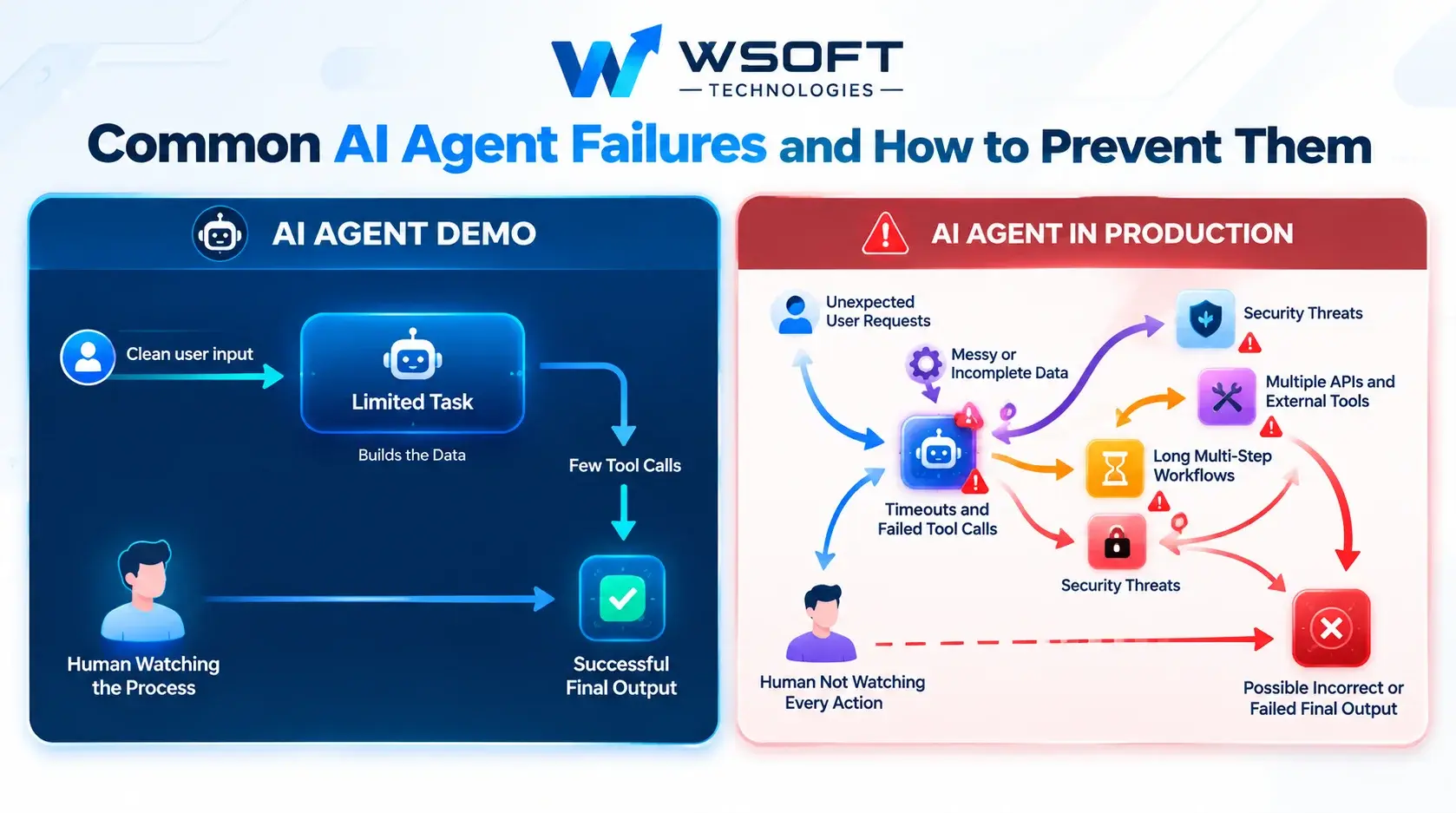
AI agents can handle customer support tickets, research tasks, data entry, and internal business operations with very little human effort. A demo may look perfect, but when an agent starts dealing with real users, messy data, and unexpected situations, problems can appear.
If you are wondering why AI agents fail in production, you are not alone. Most failures do not happen simply because the AI model is bad. They often result from weak testing, missing safety controls, poor monitoring, or unclear limits on what the agent can do.
In this guide, we will explore the most common AI agent failures and explain how to prevent them. These practical steps can help you build more reliable, secure, and cost-effective production AI agents.
Why Production AI Agents Behave Differently Than Demos
An AI agent demo usually works with clean inputs, a limited task, and someone watching the results. A real production environment is much less predictable.
For example:
- Users may enter unclear or unexpected requests.
- External tools and APIs may fail or return incorrect data.
- Tasks may involve many steps and take longer than expected.
- AI outputs may need to be checked without constant human supervision.
AI agents make several decisions while completing a task. A small mistake at the beginning can lead to a much bigger problem later.
That is why AI agent reliability should be part of the development process from the start, rather than something added after launch.
Hallucinations and Wrong Answers
What happens?
An AI agent provides incorrect information with confidence. It might invent a company policy, give the wrong figure, or provide an order number that does not exist.
Why does it happen?
AI models can generate answers that sound convincing without verifying whether the information is correct. When an agent does not have access to reliable information, it may fill the gaps with guesses.
How to Prevent AI Hallucinations
- Use trusted data: Connect the agent to approved business information through retrieval-augmented generation (RAG), where appropriate.
- Reference reliable sources: Require the agent to identify the source behind important answers.
- Allow uncertainty: Instruct the agent to say when it does not know something or needs human assistance.
- Validate important details: Check information such as order numbers, customer records, and account details before providing an answer.
These safeguards help reduce incorrect responses and make AI agents more dependable.
Infinite Loops and Runaway Costs
What happens?
The agent repeats the same action, keeps retrying a failed step, or continues working without completing the task. This can waste time, API calls, and money.
Why does it happen?
AI agents often decide what to do next based on their previous actions. If they cannot reach their goal and have no clear stopping rules, they may continue indefinitely or use more resources than expected.
How to Prevent Infinite Loops
- Set a maximum number of steps: Stop the agent after a defined number of actions.
- Apply budget limits: Set boundaries for token usage, execution time, and API calls.
- Detect repeated actions: Identify when the agent is performing the same operation without making progress.
- Create fallback options: Escalate the task to a human or use a safe alternative when the agent reaches its limits.
Clear stopping rules help control costs and prevent unnecessary processing.
AI Agent Tool-Calling Errors
What happens?
An AI agent selects the wrong tool, sends incorrect parameters, or misunderstands a tool's response. This can interrupt a workflow or cause an unintended action.
Why does it happen?
AI agents use external tools and APIs to complete tasks. If tool descriptions are unclear or responses are inconsistent, the agent may struggle to choose the correct action.
How to Prevent Tool-Calling Errors
- Write clear tool descriptions: Explain what each tool does and when the agent should use it.
- Validate inputs and outputs: Check parameters before a tool call and verify the response before using it.
- Handle errors carefully: Use limited retries and provide a safe fallback when a tool fails.
- Limit tool access: Give the agent only the tools it needs to complete its assigned task.
A smaller, well-defined set of tools makes agent behaviour easier to control and test.
Why AI Agents Lose Context in Long Tasks
What happens?
During a long task, an AI agent may forget earlier instructions, repeat completed work, contradict previous decisions, or move away from the original goal.
Why does it happen?
AI models have a limited context window. As conversations, instructions, and tool outputs accumulate, important details can be pushed out or buried among less useful information.
How to Prevent Context Loss
- Summarise progress: Create short summaries at important checkpoints so the agent knows what has already happened.
- Use external memory: Store important facts and task information in a database or another suitable storage system.
- Break tasks into smaller steps: Give each sub-task a clear purpose and the context it needs.
- Repeat key instructions: Restate the main goal and important restrictions at major stages.
- Reduce unnecessary information: Keep tool outputs focused on the details needed for the next step.
A good memory strategy helps AI agents stay focused and complete longer workflows more consistently.
Prompt Injection and Security Risks
What happens?
Malicious instructions hidden in an email, webpage, or document may attempt to trick an AI agent into ignoring its rules, exposing sensitive information, or performing an unsafe action.
Why does it happen?
AI agents often process information from external sources. If they treat instructions inside that content as trusted commands, attackers may be able to influence their behaviour.
How to Prevent Prompt Injection
- Treat external content as untrusted: Emails, webpages, uploaded files, and other external information should be treated as data, not trusted instructions.
- Apply least-privilege access: Give the agent access only to the information and tools required for its task.
- Require approval for sensitive actions: Use human approval for payments, deletions, external messages, and other high-impact operations.
- Validate inputs and outputs: Apply suitable security checks before information is processed or actions are taken.
- Keep detailed logs: Record important actions so suspicious activity can be investigated.
Security should be built into the agent's design, not added only after a problem occurs.
Skipping AI Agent Testing and Evaluation
What happens?
A team launches an agent after a few successful trials, only to discover serious problems when real customers begin using it.
Why does it happen?
AI agents can produce different results for similar inputs. A small number of manual tests cannot show how an agent will behave across different tasks, unusual requests, and unexpected conditions.
How to Test AI Agents Before Launch
AI agent testing should take place before deployment and continue whenever the system changes.
Important testing steps include:
- Build a test set using realistic tasks, edge cases, unclear requests, and potentially harmful inputs.
- Test complete workflows from beginning to end, rather than checking prompts in isolation.
- Repeat tests whenever you change the prompt, AI model, tools, or workflow.
- Record failures and use them to improve future versions.
How AI Agent Evaluation Measures Performance
AI agent evaluation helps teams measure whether an agent is actually improving. Instead of relying on impressions, track clear performance metrics such as:
- Task completion rate
- Accuracy of final answers
- Correct tool selection
- Number of steps required per task
- Cost per task
- Rate of escalation to human support
Combine automated checks with regular human reviews. These measurements help you compare versions and identify whether a change improves or reduces performance.
No Visibility After Launch
What happens?
An AI agent may gradually become less reliable because of a model update, changing user behaviour, or a broken integration. Without monitoring, the team may not notice the problem for weeks.
Why does it happen?
Without proper logs, alerts, and performance tracking, it becomes difficult to understand what the agent is doing or why it is failing.
How to Monitor AI Agents in Production
- Record important events: Log inputs, tool calls, outputs, errors, and relevant decision summaries.
- Track performance metrics: Monitor success rates, response times, costs, and common failure types.
- Set up alerts: Create alerts for unusual increases in errors, repeated actions, or spending.
- Review real interactions: Regularly sample conversations and workflows to identify problems.
- Collect user feedback: Use simple feedback options, such as thumbs up or thumbs down, to identify areas for improvement.
Good AI agent monitoring also makes troubleshooting easier. When something goes wrong, a detailed execution trace can help developers identify where the process failed.
Logs should be designed carefully to avoid unnecessarily storing passwords, sensitive personal information, or confidential business data.
Removing Human Oversight Too Early
What happens?
An AI agent receives full control over an important decision and makes a mistake that leads to financial loss, customer frustration, or another serious consequence.
Why does it happen?
Automation can save time, but not every task is suitable for complete automation from the beginning. Some decisions require human judgement, especially when the consequences are significant.
How to Use Human-in-the-Loop AI Effectively
- Require approval for high-impact actions: Keep a human involved in irreversible or sensitive decisions.
- Allow escalation: Let the agent request assistance when a task is unclear, unusual, or outside its defined limits.
- Increase autonomy gradually: Begin with human review and reduce oversight only when performance data supports doing so.
- Make handovers clear: Pass the task history, relevant information, and reason for escalation to the person taking over.
Human-in-the-loop AI is not a weakness. It is a practical way to improve safety and build confidence before allowing agents to handle more tasks independently.
A Quick Pre-Launch Checklist for AI Agents
Before deploying an AI agent, use this checklist to confirm that the essential safeguards are in place.
- The agent uses trusted data to reduce incorrect answers.
- Step, time, and cost limits are configured.
- Tool inputs and outputs are validated.
- A memory strategy supports longer tasks.
- Access permissions follow the principle of least privilege.
- Prompt injection risks have been considered and tested.
- A test suite and baseline evaluation metrics are available.
- Logging, dashboards, and alerts are configured.
- Human approval and escalation paths exist for risky actions.
- The team has a process for reviewing failures and making improvements.
Following this checklist can help your team identify weaknesses before they affect real users.
Frequently Asked Questions
Why Do AI Agents Fail in Production?
AI agents commonly fail because of hallucinations, tool-calling errors, runaway loops, context loss, security gaps, and insufficient testing or monitoring. Many of these problems can be reduced through better design, validation, and oversight.
How Do I Test an AI Agent Before Deployment?
Create realistic test tasks that include edge cases and unexpected requests. Test complete workflows, measure performance using clear metrics, and repeat the tests whenever the model, prompts, tools, or workflow changes.
How Do I Monitor AI Agents in Production?
Record important agent actions, monitor success rates, response times, and costs, and set alerts for unusual behaviour. Regularly review real interactions while protecting sensitive information.
Why Do AI Agents Lose Context During Long Tasks?
AI models have limited context windows, so important details may become unavailable or get buried as a task grows. Progress summaries, external memory, and smaller sub-tasks can help maintain focus.
When Should a Human Review an AI Agent's Decisions?
Human review is especially important when an action is high-impact, irreversible, sensitive, or outside the agent's defined limits. Oversight can be adjusted gradually as reliable performance data becomes available.
Final Thoughts
AI agents can improve productivity and help businesses automate complex tasks, but reliable performance requires careful engineering. Ground agents in trusted data, set clear limits, test them thoroughly, monitor their behaviour, and keep humans involved where necessary.
The goal is not simply to launch an AI agent. It is to build one that continues to work safely and consistently in real business conditions.
Wsoft Technologies helps businesses plan and develop AI-powered solutions with a focus on testing, reliability, security, and ongoing performance. Explore our AI agent development services or contact our team to discuss your project.
Have a project in mind?
Talk to the Wsoft Technologies team by phone or WhatsApp.